Step 4.0. Create Payment Group
Step 1, 2 & 3: Go to Payroll -> General Setting -> Payment Group Setting
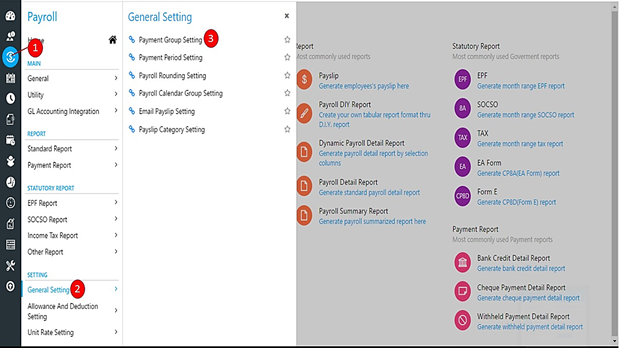
Step 4: Click the 'Create' button to create a new Payment Group.
Step 5: Enter the Code and Description for the new Payment Group that you are going to create. Typically Payment Group is named by the number of Payment to be made monthly.
Step 6 & 7: For each Payroll Rate, choose the Cute Off Period and Payroll Calendar. If you haven't create a Cut Off Period yet, please click here to view how to create a new Cut Off Period. For Payroll Calendar, you should be able to select default options from the drop down list.
Step 8: Click 'Save' button.